PuzzleFreephysicsmazelevels
Tilt
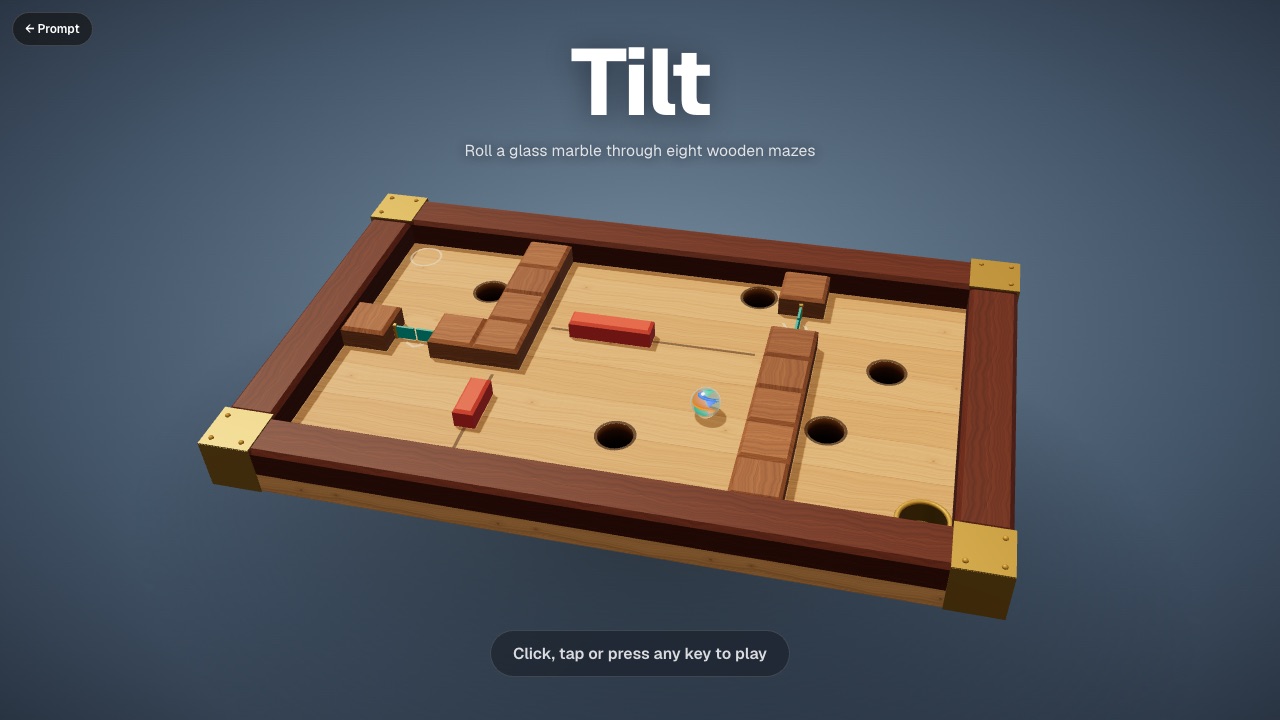
Tilt a wooden board to roll a marble past holes, moving bars and one way gates to the cup. Eight levels, three stars each, hand written physics.
 Play the demo
What the prompt builds
- Hand written sphere physics with substeps
- Levels as small text grids, easy to add
- Phone tilt control where the device allows
- Live thumbnails on the level select
Tested with Claude Code (Claude Fable 5.2) on 15 November 2026. The demo is what it built, hosted here with Three.js served from this site.
The prompt
Build a small 3D browser game called **Tilt**: roll a glass marble through wooden mazes by tilting the board.

## The game

- A wooden board floats over a soft backdrop. The player tilts the board and a marble rolls under real feeling gravity.
- Eight levels, defined in the code as small grids of characters so new ones are easy to add: walls, holes to fall through, a start, a goal cup, and from level 4 on, moving bars and one way gates. A moving bar stops short of the walls, so it pushes the marble but never crushes it. A one way gate swings open from one side and is a wall from the other. Every level can be finished, and a hole always has room to pass beside it.
- Reaching the cup plays a chime, shows the time and the best time for that level, and tilts into the next level (Enter or Space skips the wait). After the eighth, a last card offers to play again or pick a level. All levels are open from the start.
- Falling through a hole drops the marble out of sight with a hollow sound, then it returns at the start of the level.
- Three small stars per level: finish, finish under par time, finish without falling.

## Controls

- Mouse: the board tilts toward the pointer, measured from the middle of the screen. Keyboard: WASD or arrow keys. R restarts the level, Esc opens the level select.
- Touch: drag to tilt. On phones that allow it, offer "Use tilt" to play with the device's own orientation.

## Look

- Warm wood with a canvas drawn grain, brass corners, walls with a slight bevel, holes with dark inner rims.
- A glass marble with a bright highlight and a coloured swirl inside that makes its rolling readable.
- One soft key light with real shadows from the walls and the marble, and a quiet gradient background.

## Feel

- Write the physics by hand: a sphere against axis aligned walls and moving boxes, with rolling friction, a little bounce, and substeps so the marble never tunnels through a wall.
- The board's tilt eases toward the input and is limited to 14 degrees; the camera tilts a fraction of that the other way, so the motion reads clearly.
- Rolling makes a continuous soft rumble whose volume and pitch follow the speed; wall hits click harder the faster they are.
- A level select screen shows the eight boards as small live thumbnails with their stars, all drawn by the one renderer.
- On a tall phone screen the board is turned a quarter to fill it, and the input turns with it.

## Tech

- Three.js r180 as ES modules, loaded from a CDN import map. No build step and no other libraries.
- Three files: `index.html`, `game.css`, `game.js`. No inline scripts or styles.
- Everything is procedural: geometry, colours, textures drawn on a canvas, and sound made with WebAudio. No image, model, font or audio files.
- Runs at 60 fps on a laptop with integrated graphics. Cap the pixel ratio at 2, reuse geometries and materials, and use instancing for anything that repeats more than 20 times.
- Fills the window and follows resizes. Works with keyboard and mouse, and with touch on a phone (on screen controls appear only on touch devices).
- Movement uses delta time, clamped to 1/30 s, so the game plays the same at any frame rate.
- Sound starts only after the first input, and there is a small mute button.

## Attract mode

Before the first input the game plays itself: the camera moves slowly and the world is alive, with the title and "Click, tap or press any key to play" over it. The attract mode looks its best from its very first frame: it opens a little way into the action, never on an empty scene. The first input starts the game from a clean state.

## Done when

- The page opens with no errors in the console and the attract mode is running.
- Every control listed above works with keyboard and mouse, and with touch.
- A full round can be played to its end and started again without reloading: when a round ends, a panel shows the result and a "Play again" button (Enter works too).
- A short hint names the controls for the first few seconds of play, then fades.
- Nothing pops, stutters or falls through the world in two minutes of play.
How to use it
- Open an empty folder in Claude Code, Cursor, Codex or another coding agent that can write files.
- Paste the whole prompt and let the agent work until it says it is done.
- Open index.html through a local server (for example npx serve) and play. Ask for changes in plain words.